
How to Keep Your WhatsApp Data Safe With Google Drive

How to Keep WhatsApp Data Safe With Google Drive
The method is very simple and easy, you just need to link your WhatsApp data with google drive to make it secure and reliable so that you can easily use it whenever you lost in your smartphone and your precious data or chats and media will be safe and always with you. So have a look at complete guide discussed below to proceed
Steps To Sync Your Whatsapp Data With Google Drive To Secure It
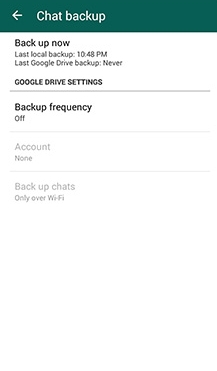
Step 1. You need to launch WhatsApp and then navigate to Menu Button -> Settings -> Chats and calls -> Chat backup.

Step 2. Now there select the option Backup To Google Drive and then set the backup frequency of your backup that is either Monthly, weekly and day according to your wish.

Step 3. Now you will move to a page where you have to use your Gmail account where your data will get backup to the drive.

Step 4. And then after clicking on “Backup over” and set the network type that you want to set for back up.

That’s it! you are done, now your Whatsapp data will automatically backup to your drive and will get back whenever you need it
The method is very simple and easy, you just need to link your WhatsApp data with google drive to make it secure and reliable so that you can easily use it whenever you lost in your smartphone and your precious data or chats and media will be safe and always with you. So have a look at complete guide discussed below to proceed

No comments:
Post a Comment